

Linking to Flexischools from your schools website
This page contains some best practice guidance for linking to and promoting our website and app from your school's website.
These recommendations are based on years of experience working with parents and canteens and can be helpful in simplifying the process of understanding how to use online ordering for both new and existing parents.
They also consider things like search engine optimisation, and a spectrum of tech-savviness, which may help parents of your school to find what they’re looking for more easily.
In summary, (and contrary to what you might expect), we’ve found that linking using the text ‘Flexischools’ or a direct link to the website ‘www.flexischools.com.au’ as the clickable element on your site can cause confusion, as parents won’t always understand the relationship or the fact that Flexischools is a tech provider.
Instead, we recommend using descriptive noun phrases rather than our brand name. As all schools can use different ways of describing their lunch or canteen services, we’ll leave it up to you to best determine which words to use to hyperlink back to us.
A few examples include: online canteen, school lunch, lunch order, tuckshop online, lunch online, canteen order, canteen app, tuckshop app, lunch order online, school canteen, school lunch orders online, school canteen app, etc.
In regards to the actual hyperlinked location (or href), we recommend using our homepage:
https://flexischools.com.au/
In terms of placements, we know all websites are different so some of these options might not apply to you. As such, we’ve listed our recommendations in order of importance. Don’t feel like you have to do all of them – option 1 and 2 are great, option 3 is there if you can’t make 1 or 2 work!
1) Tile on the homepage:
If you have the ability / space on your homepage to create a tile, we have some recommended ways of linking and example copy you’re welcome to customise. Please try and keep the links as a descriptive noun phrase (e.g. online canteen orders, lunch ordering app etc.) as we find that is the most effective way of linking to our site – especially as it’s often before parents would know of Flexischools or what we do.
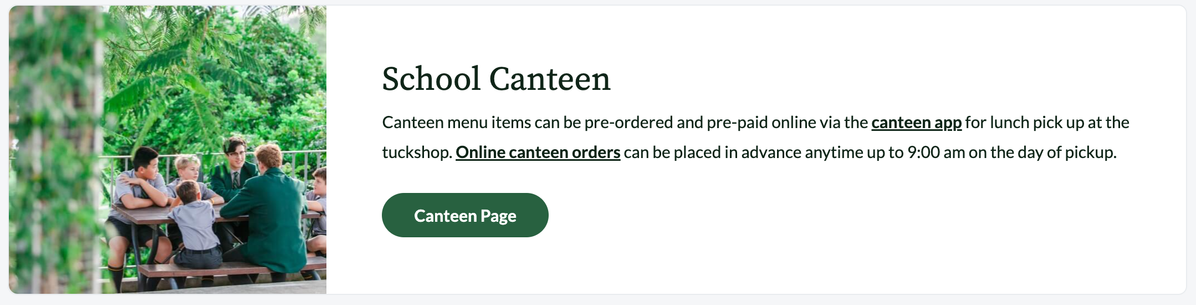
Example content – feel free to personalise to what works for your school:
Online Canteen Orders
Canteen menu items can be pre-ordered and pre-paid online via our canteen app for lunch pick up at the tuckshop. Online canteen orders can be placed in advance and changed anytime up to [7:00 am - insert your order cut off time] on the day of pickup.
HTML Code Block:
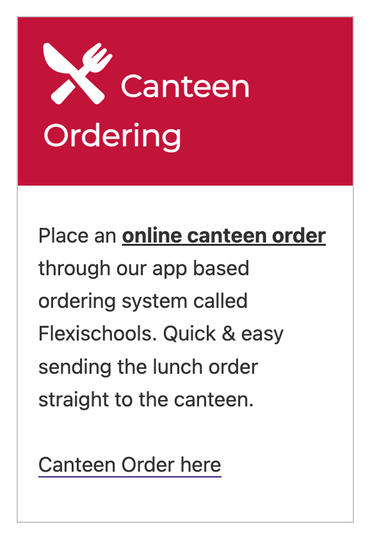
<h2>Online Canteen Orders</h2>
<p>Canteen menu items can be pre-ordered and pre-paid online via our
<a href="https://flexischools.com.au"><strong>canteen app</strong></a>
for lunch pick up at the tuckshop. <a href="https://flexischools.com.au">
<strong>Online canteen orders</strong></a> can be placed in advance and changed
anytime up to [7:00 am - insert your order cut off time]  on the day of pickup.</p>
2) Dedicated Canteen page:
If you are able to create a dedicated page for your canteen on your website and include that in the main navigation it can give you the ability to add more information about specifics on your canteen and you can include more specific information on how it operates.
The Flexischools app is very intuitive and will guide new parents through the process of signing up and explaining each step to get lunch ordered, so including a link to our website https://flexischools.com.au/ with the clickable element as a noun phrase e.g. Online Canteen Orders, School Lunch Order, Tuckshop Online, etc. is the most important element in the first paragraph, a good example introduction might be:
School Canteen Orders
The easiest way to place an online canteen order is through our app based ordering system called Flexischools. It is an easy to use online system that uses a mobile app to make ordering and paying easier and quicker and sends the lunch order straight to the canteen.
Orders can be placed days in advance with same day orders needing to be placed prior to 7:00am. The menu is available on the Flexischools app and is updated frequently and allows you to customise your order.
….
What we also recommend including this dedicated canteen page if possible is:
Opening hours / days of operation
Ordering cut off times
How often the menu is updated (and if out of stock items will be removed)
Online orders vs over the counter
How food is delivered / picked up after orders are made
Cash vs cashless
Information for volunteers
3) Footer Link:
If it isn’t possible to add a tile to the homepage or create a new dedicate page for the canteen, our last recommendation is to include a link to https://flexischools.com.au/ in the page footer template at the bottom of each page.
Parents will often check the footer of the website for related links for canteen orders and many school websites have started doing to this now, some examples of the phrases we have seen work best.
Each website is different, so do what makes sense for your information architecture, we are here to help and we can review your website and make suggestions on the best placement for links to Flexischools.